Welcome, artists & vendors, to Eventeny
Welcome to Eventeny, a simplified, efficient, and enjoyable event experience.
28,000+ events have connected with talented vendors like you for fantastic opportunities. Let’s create even more unforgettable events together.
Your event success - made simple

Check applications

Boost your profile

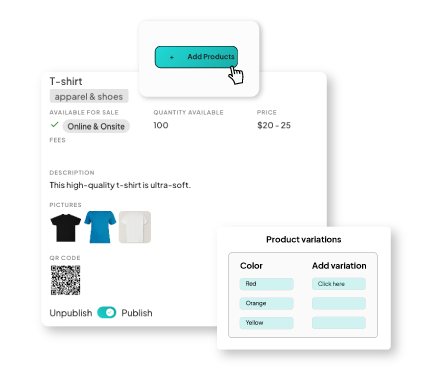
Add products

Apply to events
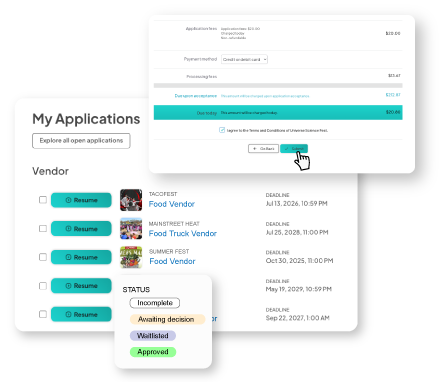
Manage your applications
Stay organized and informed throughout the application process with real-time updates, integrated messaging, and more.
- See real-time application updates: Your application status is updated in real-time. Keeping you up-to-date and prepared for every event you sell with.
- Communicate with your events: Direct messaging allows you to easily reach out to learn specifics about your upcoming and past events.
Sell products online
Your sales don't end when the event does. Upload, promote, and sell your products online with Eventeny. Marketplace setup is simple, easy, and ensures your booth never closes.
- Step-by-step videos: Go through each step of online selling. From starting your shop to uploading your whole inventory, your new shop keeps your booth open 24/7.
- Setup your payout method: Eventeny works exclusively with Stripe, one of the most used and trusted payment processors. Setup your payout method here and start selling today.
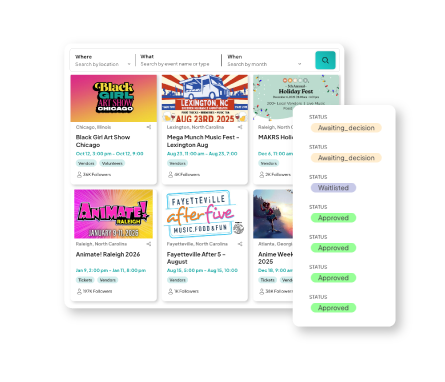
Apply again!
28,000+ events are using Eventeny and most of them are finding their artists, vendors, and exhibitors here too.
- Search listings: Search through application listings & find events that match your business goals.
- Submit applications: Submit your application by providing the required information and materials.
- Contact event organizers with ease: Direct message event organizers for communication made easy.
FAQs for vendors & artists
General
How do I change my password?
Visit our page on how to change and manage your password to make sure you have access to your account.
How can I access my Eventeny.com account if my event organizer created my submission?
- If you know your Eventeny.com password and have set up your account - you can log in here to access your account.
- If you do not have an account or password set up yet, immediately click 'Forgot Password' to reset your password.
- Input your email address and click 'Send password reset link' (the one you've received this email through).
- You will receive an email from Eventeny to reset your password. It will look like this: Click the blue button to reset your password.
- Input the new password twice for verification. Click 'Reset Your Password'.
- Navigate back to the Eventeny.com/users page to sign in with your newly reset password.
How can I update my vendor profile information?
As a vendor, you can always update your vendor business profile within your Account Settings. This Business Profile holds necessary information including your business address, business name, phone, email, etc.
To set up, or update your Business Profile information, please follow these steps laid out in the following article:
Products
How much does my shop cost?
Your shop page is free to have! The fees are only based on transactions, meaning you don't pay until you're getting paid.
When you sell an item, there's a small fee to cover the costs (5% transaction fee) and standard credit card processing fee (~2.9% + $0.30) on the full price, including shipping and taxes. More details can be found on our Selling on Eventeny page.
How do I get paid for my sales?
We work with Stripe, the same financial infrastructure behind Amazon, Google, AirBnB, and many more.
Just set up your payout method and you're all set.
If you have more questions, you can find more information here.
How many products can my shop have?
Your shop page doesn't have a limit of products. This makes your shop a great place to showcase your entire inventory or make sales when you're not traveling with everything.
I have more questions. Where can I find answers?
We have a dedicated page where you can find answers to your questions.
Applications
How can I access my Eventeny account if my event organizer created my submission?
- Go to Eventeny.com/users.
- If you know your Eventeny.com password and have set up your account - you can log in here to access your account.
- If you do not have an account or password set up yet, immediately click 'Forgot Password' to reset your password.
- Input your email address and click 'Send password reset link' (the one you've received this email through).
- You will receive an email from Eventeny.com to reset your password. It will look like this: Click the blue button to reset your password.
- Input the new password twice for verification. Click 'Reset Your Password'.
- Navigate back to the Eventeny.com/users page to sign in with your newly reset password.
Can I see a list of other vendors participating in the event?
Each event is a bit different in this regard and depends on the Event Organizer’s subscription level with Eventeny.com. If your Event has a map published, or your Event Organizer releases an official Eventeny.com map, with attached booth assignments - the list of other vendors attending the event will be within the booth assignments of the map.
Always reach out to your Event Organizer directly to clarify the exact list of vendors in attendance for your upcoming event, and if they choose to release such a list prior to the event.
What do I do if I accidentally submit my application with the wrong details?
If you accidentally submit your application with the wrong details, the Event Organizer may have set the permissions of your application to edit your application after submission. Follow the following steps, to see if this is a capability:
- Ensure you've logged into your Eventeny.com account by following the instructions above.
- Once signed in, you'll be taken to the Eventeny.com homepage; click on 'View my applications'.
- View your application by clicking 'view or edit' next to your app. (Application titles will vary based on your chamber status & vendor type).
- View your application, with your vendor information attached. UPDATE YOUR PAYMENT INFO BY CLICKING THE PEN ICON NEXT TO 'Update Payment'.
If the above actions are taken, yet there are no ‘pen’ icons next to your information - this means the permissions set on your application are such that there is no editing allowed after you’ve submitted your application. Reach out to your Event Organizer directly to request permission to update your applications information.
How will I make payments as a vendor?
All payments for vendor booths and registration will be accepted through Eventeny via CC, ACH, or Debit Card. Upon submitting your application for vendor registration, you will be prompted to input your CC or bank information. This process will not only make it easy to track transactions but also to manage payments by simply attaching your payment details to your booth and electrical outlet charge.
- Your payment details will be collected upon checking out and submitting your application through Eventeny.
- Your payment details will be held on file in an encrypted manner so that no one but you will ever know your full bank or card information. This will protect your information and ensure that everything sensitive will remain private.
If you are selecting your own booth through Eventeny, then a confirmation email will be sent as soon as your application has been approved. Once approved, you will be prompted to select a booth on Eventeny and pay for the booth after you’ve made your selection.
How do I pay for my booth space for vendor fees?
Payments towards booth spaces and vendor fees are generally up to and organized by the Event Organizer hosting the event. Upon submitting your application on Eventeny .com, generally - you will input your payment method on file. This will provide the Event Organizer with the below options for your payment method on file to be charged for your chosen booth space and allocated vendor fees.
Common ways you will be charged for Vendor Fees through Eventeny.com:
- Upon Submission of Your Application
- Upon Approval of Your Application
- Charged at a Later Date - Pre-Declared by the Event Organizer
- Manual Charge - Charged by the Event Organizer
Always reach out to your Event Organizer directly to clarify the exact method for you to pay for your booth space and vendor fees.
What is the refund policy for vendor fees or event cancellations?
Refund policies for each event are declared by the event organizer. Always reach out to your event organizer directly to clarify the refund policy for vendor fees or event cancellations. This includes necessary deadlines, permissions and policies.
How can I find and update my application inside Eventeny.com after submitting it?
Once you’ve applied through the provided application link, you will receive a confirmation email stating your application has been submitted. With the email you’ve used to apply, you can log into Eventeny.com to update your application should you need to revise or further update any details.
- Ensure you've logged into your Eventeny.com account by following the instructions above.
- Once signed in, you'll be taken to the Eventeny.com homepage; click on 'View my applications'.
- View your application by clicking 'view or edit' next to your app. (Application titles will vary based on your chamber status & vendor type).
- View your application, with your vendor information attached. UPDATE YOUR PAYMENT INFO BY CLICKING THE PEN ICON NEXT TO 'Update Payment'.
Can I receive updates or notifications from the event organizer about changes?
Yes, updates and notifications regarding updates to your event, can be made available on a case by case basis from your Event Organizer directly. Look out for emails from your Event, through Eventeny.com - or any other external communication channels you currently receive communications with from the Event Organizer.
If you have any questions or need additional information on this matter - please reach out to your Event Organizer directly.
Where and how do I submit my application?
Application links are announced by the Event Organizer. Upon receiving the application link or Event Information Page link for the event you will be applying to, you will be taken to the application on Eventeny.com, where you will be prompted to fill out the required information. It will be helpful that you create an Eventeny profile prior to filling out the application, so that when or if you need to make adjustments to your application, you can log into your account and do so. You can also access your application with the username you provided upon filling out the application, you will simply need to go through the process of setting a password by clicking ‘Forgot Password’ to reset upon signing in.
Your application will be submitted through the link provided by your Event Organizer, or as available on the Event Information Page. Once you’ve applied, you will receive a confirmation email stating your application has been submitted. The Event Organizer will then approve and manage your application through Eventeny.
What are the CC, ACH, and payment processing fees?
Eventeny and Stripe do charge CC, ACH, and Payment processing fees. This is a minimal additional charge; however, it is imperative that you are informed of such charges so that you can plan accordingly.
Vendor Application Fees: a 5.9% charge is in addition to charged services.
What if I need to make payments in installments?
If you need to make payments in installments, reach out directly to the Event Organizer of your event.
How do I check the status of my application or approval?
After submitting your application for an event hosted on Eventeny.com, a confirmation email will be sent to the email address tied to the email address you input upon submitting your application. Once the Event Organizer has updated the status of your application as approved, rejected, waitlisted, or withdrawn - a confirmation email notifying you of your status will also be sent to the same email address.
Additionally, you can log into Eventeny.com using the email address you submitted the application through, to check your application statuses. Simply log in to Eventeny.com, navigate to > ‘Participate’ at the top of the home screen > under ‘Artists Vendors, and Exhibitors’, click ‘View My Applications’. This will take you to the full list of all of your submitted applications, with their current status.
‘Approved’ - The Event Organizer has approved your application, and you are set to go for your event. Payment processing for vendor fees and booth spaces may vary. Contact your Event Organizer directly to understand when and how your payment will be processed.
‘Awaiting’ - The Event Organizer has yet to attend to, or make a decision on your application. This is normal leading up to the event. If you have questions, or require updates on the status of your application - please contact your Event Organizer directly.
‘Rejected’ - The Event Organizer, for reasons beyond this guide - has decided to reject your application. Please reach out to your Event Organizer directly for clarification on the reasons for the rejection decision.
‘Waitlisted’ - The Event Organizer, for reasons beyond this guide - has decided to waitlist your application. Please reach out to your Event Organizer directly for clarification on the reasons for the waitlist decision.
‘Withdrawn’ - The Event Organizer, for reasons beyond this guide - has decided to withdraw your application. Please reach out to your Event Organizer directly for clarification on the reasons for the withdrawal decision.
Events
How do I change my assigned booth space or location?
Please reach out to your Event Organizer directly to update your booth space assigned to the event.
How do I access my event’s schedule or setup details?
Event set up details are facilitated solely by your Event Organizer. Commonly, these details will be located at the beginning of your application upon applying for the event. You can view this vital information by reviewing the original application page, or by viewing your application inside of your Eventeny.com account. By clicking ‘View or Edit’, you will be taken to your application submission - with the relevant Description and Terms and Conditions for your application at the top.
Can I add special requests or accommodations for my booth setup?
Yes, all special requests are available to be submitted at the end of your application upon submitting.
How do I get help if I’m having trouble with event registration or login?
If you believe you are experiencing issues with your Eventeny.com account, or vendor submission - please first conduct the following troubleshooting steps.
- Clear your browser cache.
- Restart your browser.
- Switch to a new browser - ie, Chrome, Firefox, Internet Explorer, or Safari
If you have tried all of the above steps, and they still fail to work in troubleshooting your issue - please reach out to support@eventeny.com with relevant screenshots, screen recordings, and an exact breakdown of how you are experiencing your issue.
How do I send a message to an event organizer?
- Ensure you've logged into your Eventeny.com account by following the instructions above.
- Once signed in, you'll be taken to the Eventeny.com homepage; click on 'View my applications'.
- Click 'Contact Organizer' next to your application.
- It will take you to a pop-up page with helpful resources crafted for Eventeny.com users. Click 'Contact Event Organizer' to initiate a conversation with your Event Organizer.
- Arrive at your messaging inbox - here, you can send direct messages.
What if I can't attend the event, can I transfer my spot to another vendor?
Generally, no - however, this type of situation is best handled by your Event Organizer. Please reach out to them directly to request a transfer of your spot to another vendor.
Can I edit the dates and times of my event participation after registering?
This is dependent on the Event Organizer’s set permissions for your application before registering. If the Event Organizer has set the permissions on your application to allow editing after you have submitted your application, follow the instructions above on ‘How can I find and update my application inside Eventeny.com after submitting it?
How do I cancel my participation in an event, and will I get a refund?
Cancellation requests for your approved or submitted application can be made by directly contacting your Event Organizer. All cancellation requests may be subject to non-refundable charges. Check with your Event Organizer if you’re able to cancel, and ask for a refund for your submitted vendor fees.
Refunds and requests for refunds are handled directly through the Event Organizer. IF the Event Organizer has set deadlines for when refund requests shall be made, those are to be followed, unless agreed upon otherwise with your Event Organizer.
Can I offer online sales or virtual services through my booth?
Yes, you can offer online sales or virtual services through your booth on Eventeny.com. As a vendor, the platform allows you to promote and sell your products or services, expanding your brand's visibility. Setting up your marketplace is simple, giving you access to a wider audience, streamlined sales processes, and event-specific marketing opportunities.