Enhanced ticket analytics powers up
your strategy
Visualized real-time data shows you all of your ticketing purchases, who’s buying, and where.
Access all ticketing tutorial videos here.
Advanced analytics are at the heart of event growth
When you have a real-time view of your ticket sales, processing, and delivery, you have:
★ A clear view of how your event is doing, right now
★ Understanding of where your money is coming from
★ Solutions to clarify buyer personas & inform targeting
★ Data to optimize sales strategies & campaigns
★ Support for logistical planning & risk management
★ A continuing strategy made for growth
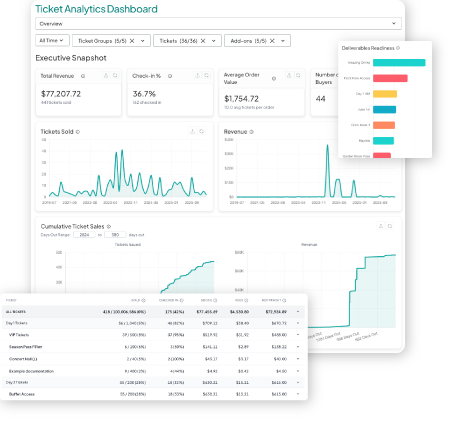
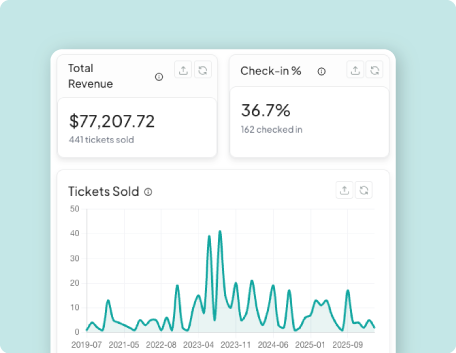
OVERVIEW REPORT
A realtime snapshot of how your event success is doing now
An executive snapshot shows your progress at a glance with visualization, sales trends, and revenue tracking.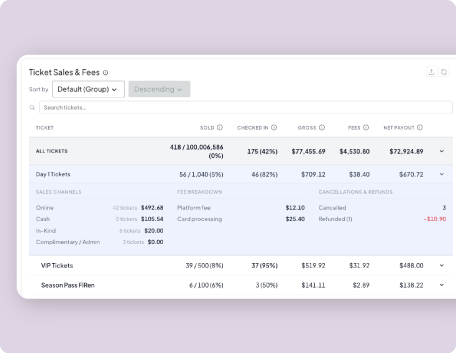
SALES & DISCOUNTS REPORT
See everything about where your money is coming from and how
Ticket statistics are organized with clarity. Or, drill down for more in depth information on each ticket type.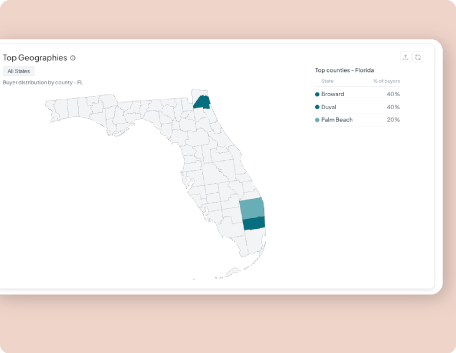
BUYERS REPORT
Determine buyer personas & inform your advertising & marketing
See every ticket sale time and location, down to the hour, state, & county, of the purchase.
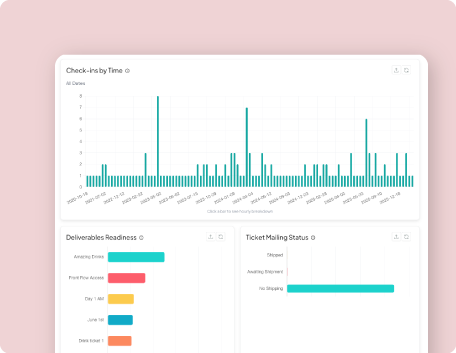
OPERATIONS REPORT
Get real time day-of tracking for logistical planning & team deployment
Enjoy full confidence in your ticket delivery & check-ins as you welcome attendees with confidence & ease.Do I have access to ticket analytics now?
How do I access the new ticket analytics?
Just follow these steps to dig into your event’s advanced ticket analytics
-
Go to your event’s page
-
Go to “Tickets” in the left hand navigation and select “Analytics”
- In the top right corner, select “Preview New Analytics”
Is there more information available on accessing my ticket analytics?
We have lots of resources for your ticketing needs. Here are two resources for all of your ticketing guidance.